Showing posts with label ABAP selection screen. Show all posts

How to Enable the Microsoft word text editor in SAP Script and SAP SMARTFORMS?

Enabling MS Word Editor for SAP Script and SMARTFORMS?


Execute the program RSCPSETEDITOR.


You will see the selection screen with the option to enable the editor.


Check the checkbox as per your requirement for SAP Script or SAP SMARTFORMS.


You can also select ‘Multi-Character Format Support’ if you want to use the hided text in the multi-character formats during ITF to RTF Conversion.


How to hide a Parameter in Selection Screen?


How to show and hide the Parameters in Selection Screen through ABAP Programming?


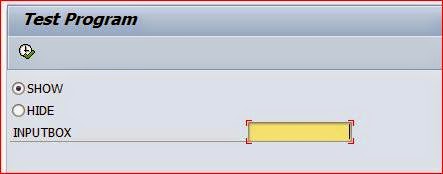
Initialize a Radio Button for showing the parameter and a radio button to hiding the parameter.
A Parameter field in the selection screen.


The changes and radio button behaviors are done in the AT SELECTION-SCREEN OUTPUT event.

The screen is modified using the below codes and enabling and disabling is done using setting 0 or 1 for the screen field screen-active.

MODIF ID ‘MOD’ is used to access the parameter ‘inputbox’ in the selection screen.


Output when selecting ‘SHOW’ Option


Output when selecting ‘HIDE’ option


How to enable and disable a parameter in the selection screen?


Enabling and disabling Parameters based on radio button selection - SAP ABAP

Initialize a Radio Button for enabling the parameter and a radio button to disable the parameter.

A Parameter field in the selection screen.


The changes and radio button behaviors are done in the AT SELECTION-SCREEN OUTPUT event.
The screen is modified using the below codes and enabling and disabling is done using setting 0 or 1 for the screen field screen-input.
MODIF ID ‘MOD’ is used to access the parameter ‘inputbox’ in the selection screen.


Output when enabler is selected


Output when disabler is selected. You can’t enter any values in the inputbox.


Adding TABSTRIP in ABAP Selection Screen - SAP


How to add Tabstrips in Selection Screen using ABAP programming?

SAP ABAP Programming


Define a selection screen 100 as the subscreen. Within the subscreen, define a parameter according to your requirement.


Define a selection screen 101 as the subscreen. Within the subscreen, define a parameter according to your requirement.


Now assign the Tabs to the subscreen 100 and 101.


Name the Tabstrips as per your requirement.


Press F8 to execute the program and you will see the result as below.


Adding Push Buttons in Selection Screen Toolbars - SAP ABAP


Adding Push Buttons in Toolbars

SAP ABAP

The screen fields in the selection screen are controlled by the structure SSCRFIELDS.


You have at max of 5 push buttons to be used in the selection screen.


Push buttons are declared in the selection screen using FUNCTION KEY.


Each FUNCTION KEY is assigned to the SSCRFIELDS structure and the text label for the push buttons can be labelled in the structure elements. See the program below.


In the initialization event, the respective texts for the buttons are assigned to the functxt_01 to functxt_05.


In the AT SELECTION-SCREEN event, the function code is automatically assigned in the
SSCRFIELDS-UCOMM.


Output